Unapplied Transactions Report
Last updated: October 27, 2026
The Unapplied Transactions report provides a list of all of the requests the Denim team has created to seek more information on unapplied funds we have received from your customers. You can use this report to help close out invoices by working through the queue of open requests.
What are Unapplied Transactions?
Unapplied transactions occur when Denim receives funds from a customer without sufficient details to accurately apply the funds to open invoices. When this happens, our team creates an Unapplied Transaction Request seeking your assistance, which will appear in your Request Center overview and in this report.
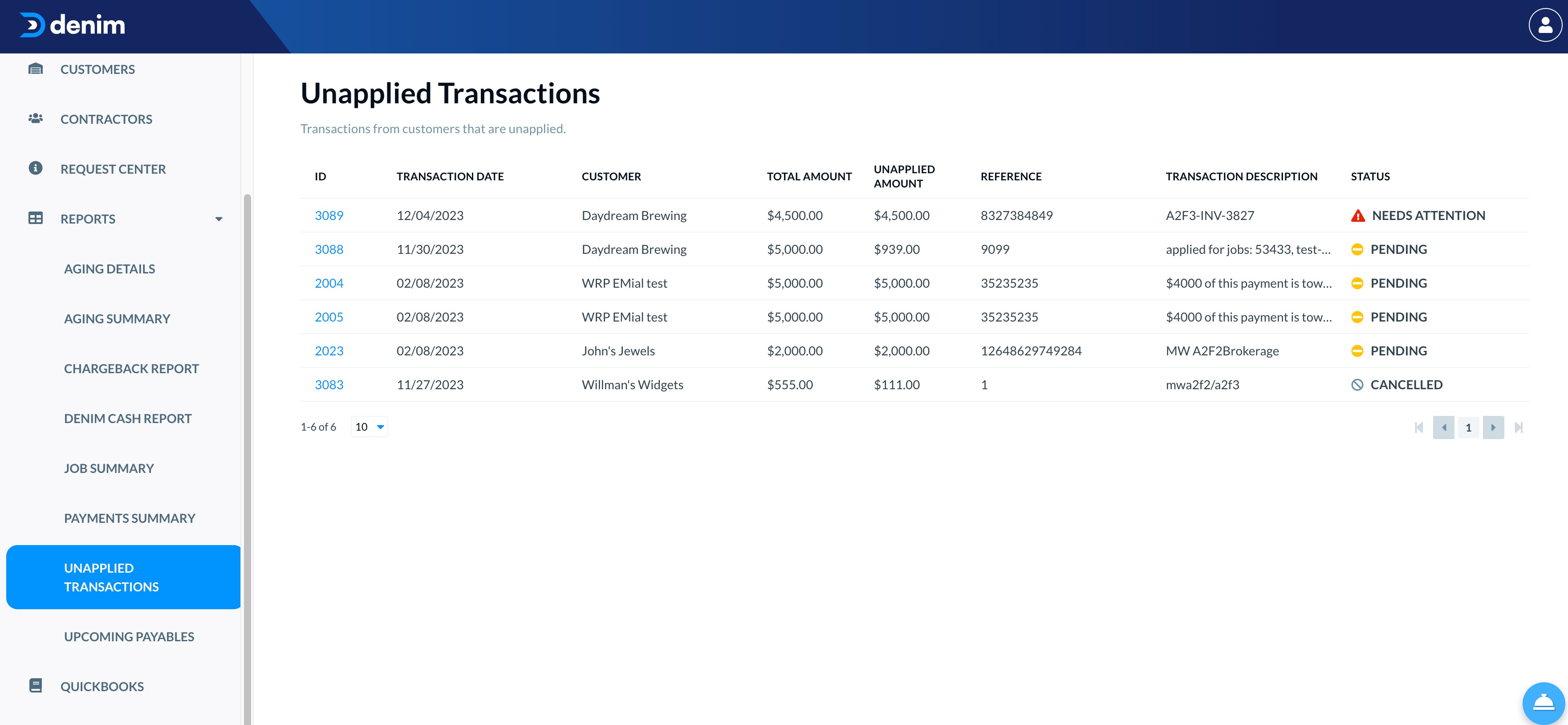
The report:
Resolving unapplied transactions
For an incoming customer payment that needs to be matched to invoices, send the remittance advice or payment details on the same day as the payment when possible. This can help prevent delays in applying the funds, but it does not guarantee an application date and does not apply to every payment method.
Provide the information requested
Open the related Request Center item and follow the exact document and information requirements shown there. If the notice specifically asks for remittance advice or other documentation identifying the invoice(s) covered and the allocation amounts, upload that documentation. A bare invoice or job number is not sufficient for a notice with that requirement. Do not assume this evidence rule applies when the notice does not specify it, and do not assume that providing the documents guarantees or schedules application.
When a reference does not match a job
If a remittance reference does not match any job in Denim's records, do not guess which job the payment belongs to or apply it based on an assumption. Ask the customer to identify which job corresponds to the reference. The payment remains unapplied until the mapping is confirmed, and the cash team must still review and apply it.
When only part of the payment is explained
If Denim has applied the invoices identifiable from the remittance but part of the received payment remains unapplied because the remittance does not account for the full payment, Support may request the complete remittance for the total payment, including all invoice allocations. Use the full remittance so the remaining funds can be reviewed accurately; do not infer an allocation from a suspected match or a partial invoice list. Receiving the remittance does not guarantee or schedule application.
When the payer is unidentified
If a transaction is shown as Unknown Debtor, no client, or no remittance, do not associate it with a potential recipient or add it to that recipient's Unapplied Transactions queue based on the amount alone. Ask the potential recipient to confirm that the payment is theirs before associating it with their account. Confirmation establishes the payer relationship only; it does not identify the invoices covered or mean the funds have been applied. Follow the separate remittance and allocation review process.
When a description names loads
If the payment description names one or more loads and the customer is unsure whether they are recorded under the same job references, ask the customer to:
- Verify whether each referenced load was factored and locate its job in the account.
- If a referenced load was not factored, follow Support's direction to add it as a non-factored job so the received payment can be reviewed. This does not let the customer apply the funds themselves or guarantee application.
- If the load was factored under a different job ID, provide the correct job ID or IDs in the Request Center comments so Collections can match and review the payment.
Do not create duplicate non-factored jobs for loads that were already factored, infer the correct job from the amount, or promise application before the payment is reviewed.
- ID column lists the request ID. Clicking the ID number on a request will route you to the Request Center. There, you can see additional details, upload remittance paperwork, and send notes to Denim.
- Transaction Date is the date Denim received the funds.
- Customer the company that sent the funds to Denim.
- Total Amount is the full amount received by Denim.
- Unapplied Amount is the remaining amount after any invoices Denim was able to close with the information provided by the customer.
- Reference is the transaction reference number, such as an ACH code or check number.
- Transaction Description is any description provided by the debtor. This is where Denim usually finds the remittance details to apply funds to invoices.
- Status is the current status of the request. This status may be automatically updated as we work on the transaction.
- Needs Attention is used when Denim needs your help resolving a transaction and is awaiting your reply.
- Pending is used once you have provided a response, while Denim is working to use that information to close the transaction.
- Cancelled means the request has been closed. It does not by itself confirm that the entire transaction balance was applied or that no unapplied credit remains. Check the transaction's Unapplied Amount, and ask Support to investigate if the amount and request status do not agree. In a verified case, Support said a remaining balance would appear in the next week's unapplied-transactions report; do not infer a zero balance or promise report timing from the request status alone.