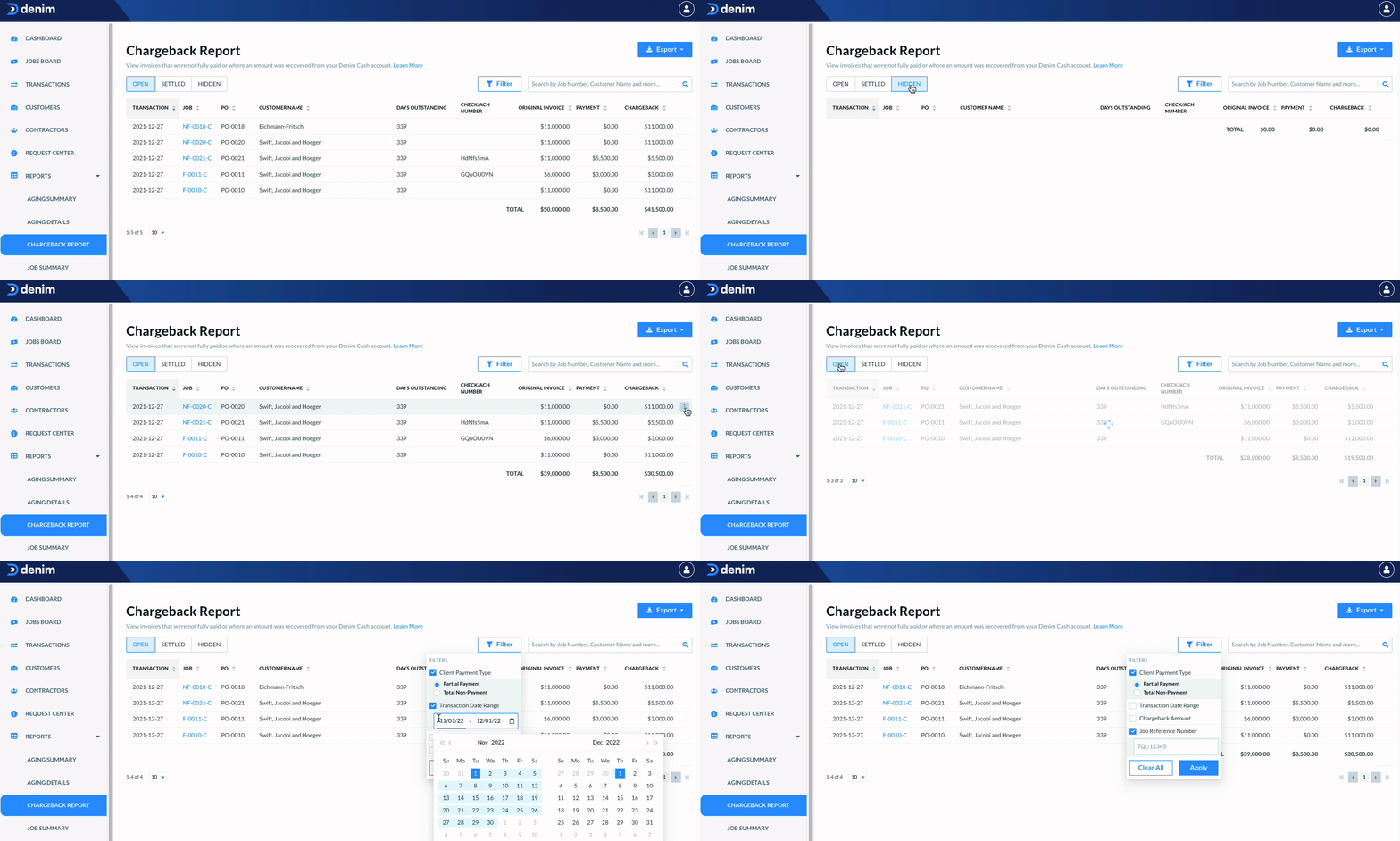
Chargeback Report: payment allocation, duplicate payouts, recovery, status, and notices
Last updated: October 27, 2026
In this article, you will learn
_____________________________________________________________________________
Using the Chargeback Report
The Chargeback Report shows a comprehensive list of invoices that were either fully or partially charged back to your Denim Cash account. These can be due to aging, disputes, nonpayment from your customer, or short-payments (when a debtor pays less than the invoiced amount).
How chargebacks affect your payments: When a chargeback occurs, Denim deducts the chargeback amount from your future payouts. This means your current payment amount may appear lower than expected if a previous chargeback is being deducted. For example, if a job total is $368.64 but a previous chargeback of $60.00 exists, the actual payment you receive will be $308.64. Chargebacks are applied against the net payment, resulting in a reduced amount credited to your Denim Cash account.
To find the report, click on Reports in the left-side navigation. In the expanded view, click on Chargeback Report.
The Chargeback Report page shows you a list of invoices, defaulting to Open status.
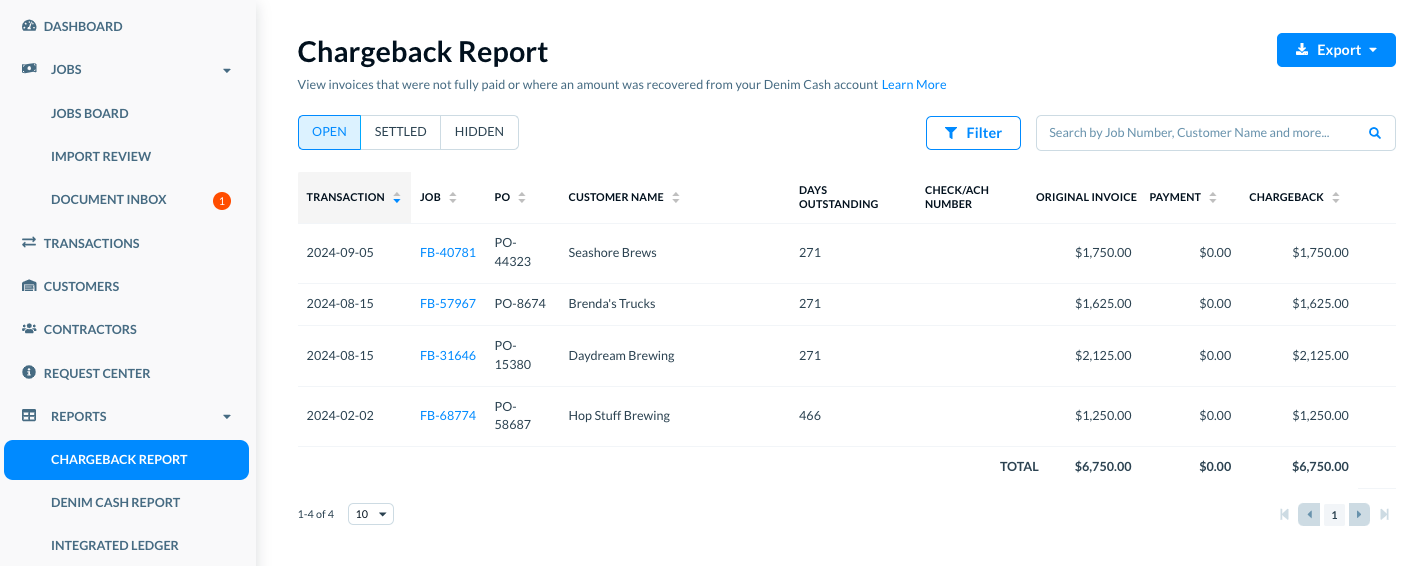
In the list, you can:
Use tabs to find the types of invoices, whether these are Open, Settled, or Hidden
Use filters to customize settings to see specific types of invoices
Use the search to find invoices by customer name or job number.
Export the chargeback report to PDF or a CSV file
All these actions are explained in the following sections of this article.
___________________
See list of invoices
See the following details for each invoice in the list.
Transaction: The date of the chargeback for the invoice.
Job: The Job number. Clicking this link takes you to the Job Detail view.
PO: The customer PO number associated with the invoice.
Customer Name: The customer billed on the job.
Days Outstanding: The number of days since the original job approval date (this number continues counting after the chargeback occurs).
Check/ACH Number: The reference number of the customer payment, if a partial payment was applied. This field is blank if no customer payment was received.
Original Invoice: Total amount billed to your customer.
Payment: Payment amount, if any, received from your customer. If this amount appears lower than expected, it may be due to a previous chargeback being deducted from the current payment. Chargebacks are applied against the net payment, resulting in a reduced amount credited to your Denim Cash account.
Chargeback: The amount Denim charged back to your Denim Cash.
💡Note: The Transaction column shows the last transaction for that specific invoice.
Total
The Total at the bottom of the table shows the amount of all invoices, either open or settled. This way, you know the exact breakdown of all invoices, payment, and chargebacks that will change based on selected filters.
___________________
See invoice types
By default, the Open tab is selected to show you all the invoices where your customer has still not paid in full, even though the invoice is closed out. These are invoices that you can reach out directly to your customer for payment, which will, in turn, result in a reimbursement to your Denim Cash account.
Short-Payment Chargebacks: If a chargeback resulted from a short-payment (where the debtor paid less than the factored amount), contact the debtor directly to resolve the payment discrepancy rather than the customer. For example, if a load was factored for $1,175.00 but the debtor only paid $925.00, the $250.00 shortage will appear as a chargeback. Since the shortage originated from the debtor's payment, the debtor is responsible for addressing the short-payment issue.
If a debtor or broker says a charged-back load was moved or renumbered: Contact the debtor or broker to obtain the replacement load reference, then have the replacement load submitted to Denim as a non-factored job. Payment received from the broker for the replacement load is applied when received. A new load number alone does not prove that the broker paid or that the chargeback was reversed; broker payment and its application to the account must be confirmed.
If payment was already sent but cannot be matched to the chargeback, contact Support with the load and invoice identifiers and the payer's remittance advice. A receipt or payment confirmation is proof of the transaction, but does not necessarily identify the client or invoices or loads the payer intended to cover. Ask the payer for remittance information showing the intended invoices or loads and relevant amounts or allocations, then send it to Support for case-specific review. Do not assume that a receipt alone establishes allocation, or that the payment will be applied, reversed, refunded, or processed within a particular time.
Pickup dispute involving a different carrier: Contact the party involved in the load listing and request a new rate document showing the actual carrier company. A corrected rate document does not guarantee that the chargeback will be reversed or reimbursed.
Payment issued or cleared but chargeback remains: Contact Support with the load and invoice identifiers and any available payment identifiers or remittance proof for case-specific investigation. A payment confirmation or payer promise does not by itself prove that Denim received, processed, or applied the payment. The evidence does not guarantee that the payment can be located, that the chargeback will be reversed, that a refund will be issued, or that there is a specific timeline.
Card-payment discrepancy: Individual card transactions can be successfully applied while a separate processor dispute reduces the net settlement received by Denim. If confirmations appear to exceed the amount credited, do not assume the payments were misapplied or that receipts prove the full amount reached Denim. Provide Support with the confirmations and affected invoice or load references so it can reconcile the transaction records and any separate processor dispute. This is account-specific; no payout, credit, recovery, chargeback, refund, or timing is guaranteed.
Payment received after a chargeback: In one case-supported process, reapplication to Denim Cash could occur after the payment was actually received and processed, with an estimate of up to 24–48 hours after receipt. This is not a universal or guaranteed window. A broker's promise or payment notice is not proof of receipt or processing; ask Support to confirm the account-specific status and disposition.
Payment sent directly to a carrier: A direct payment to the carrier is not proof that Denim received or applied payment. Route the request to Support for review. If a payment is received and posted, a case-supported process may credit funds back to reserve; do not represent that credit as complete until account records confirm it.
Payment hold during carrier onboarding: If the chargeback is due to a debtor payment hold while the carrier packet is being completed, ask the debtor or broker about the hold. Contractual liability and account-specific questions require human review; no payment release or chargeback reversal is guaranteed.
Denim Cash credits: A Denim Cash credit can offset a negative Denim Cash balance. The balance may be recovered from subsequent client advances, so read the transaction ledger together with the current balance rather than treating every giveback credit as an additional bank payout.
Chargeback notice says requested paperwork was not received: Follow the specific notice. If it requests a complete POD packet, the carrier should submit every requested POD page through the Request Center by the deadline stated in that notice. Acknowledging the notice does not prove upload, receipt, or acceptance, and submission does not establish that the recovery is cured, removed, or funded. Do not generalize one notice's documents or deadline to another case.
Current pending-chargeback notice: If a notice lists a non-factored invoice, amount, and date, treat it as conditional: the stated amount will be deducted from Denim Cash if the invoice remains unpaid by the date in that notice. It is not proof that the chargeback has already posted. For a non-factored job, the notice may also state that the customer is responsible for ensuring the carrier is paid. A declined net-terms request alone does not establish the reason for a particular chargeback. Ask the assigned Client Relationship Manager or Support about the specific account and follow any legal-routing direction on the account.
Document later confirmed as unnecessary: If a load was charged back because of a document requirement, such as a scale ticket, and the debtor or broker later confirms in writing that the document was not required, send that confirmation and the relevant load details to Support for case-specific review. Review may result in removal of the chargeback and return of funds to Denim Cash, but neither outcome is guaranteed.
Wrong debtor or broker on the invoice: If Support verifies that the invoice should identify a different debtor or broker, ask Support to review and correct the billed broker. Have the corrected invoice reviewed by that broker. If the broker pays and Denim receives the funds, the chargeback may be reflected in Denim Cash. Send Support any proof of payment or remittance so it can be matched when received. This does not guarantee a reversal, credit, or a specific processing time.
To help prevent this issue, whoever submits the load should verify the intended broker profile against the broker's MC number before submission. If a broker reports that it did not receive an invoice or a notice identifies the wrong broker, have Support verify the load and billed broker and review any correction or rebilling. Do not assume every missing invoice or chargeback resulted from profile selection, or claim that an invoice was corrected unless Support confirms it.
Former factoring provider after a buyout: Only when Support confirms from account records that a former provider applied broker proceeds to a negative reserve, that finding may explain why Truckstop did not credit the payment in the reviewed case. The customer can ask the former provider for its reserve activity report and provide Support with relevant load or invoice identifiers and readable remittance for separate reconciliation. Do not infer the reserve disposition or promise recovery, refund, reversal, fee treatment, or timing.
Requesting a payment arrangement: Ask Support whether a payment plan can be considered and state the amount you could pay weekly. Any terms require case-specific review and approval; eligibility, approval, payment amount, and availability are not guaranteed.
Missing receiver signature: If a broker rejects an invoice because the BOL lacks a receiver signature, review the load documents and identify which signature belongs to the receiver. Support may proceed with reinstatement review after that confirmation; do not state that the load has been reinstated until Support confirms it. Check the Request Center for collections or documentation requests and respond by the deadline stated in the applicable request. Some requests may allow a typical 7–10 business-day response period, but this is not a universal guarantee; missing the stated deadline may lead to recovery.
Non-factored jobs: A non-factored job can still have a chargeback even when Denim did not advance funds. In some cases, unpaid or aged invoices—typically around 90 or more days—are charged back to clear the receivable and prevent it from remaining in open accounts receivable. This aging period is typical, not a universal deadline. The chargeback or receivable status is separate from the carrier payable: a non-factored job is not paid out until the customer pays Denim. In a case where Support verifies this accounting treatment, the carrier and client payable entries may be automatically credited to Denim Cash to offset the receivable debit. Those linked credits are not an additional chargeback deduction and do not prove a payout or refund.
After the customer payment is applied, check the job's payable and status. The payable should then be released and the job marked complete; if the job remains Approved after payment posts, the payable has not been processed yet. Monitor chargeback notifications or the report and separately track or settle the corresponding carrier bill. A chargeback itself does not pay or cancel that payable. Direct questions about a particular balance or adjustment to Support; do not assume a particular net balance.
Collections or recovery request for a complete Rate Confirmation: If the notice asks for a complete broker-issued Rate Confirmation that includes billing key codes, obtain it and submit it through the Request Center by the deadline stated in the notice. Alternatively, provide an email from the broker confirming that it will release payment. If the document is unavailable or the requirements are unclear, contact the broker for the document or clarification. Support can review the request after receiving one of the specified items and work toward removing the recovery status, but submission does not confirm that recovery will be removed, payment released, or a deadline extended. Follow the deadline and consequence in the current notice rather than assuming a general timeframe.
Broker payment later refunded because the load was not completed: When Support records confirm that a broker payment was refunded and document that the carrier did not haul or complete the load, the original broker payout record does not by itself show that the funds remained with Denim or were misapplied. Contact the broker for details about the non-completion and refund. Do not infer the refund reason, correct application, chargeback reversal, or payment outcome from a customer-provided payout report alone. Refer account-specific questions to Support for case-specific review; no reversal or timeline is guaranteed.
Duplicate rate confirmation submitted for financing: Submitting the same load paperwork or rate confirmation more than once for financing can create a duplicate financed submission and a chargeback or recovery of the duplicate advance. Check that a confirmation has not already been submitted before resubmitting it. This is different from combining rate confirmations for multiple loads in one request, and not every duplicate-document case has the same outcome. Do not promise that a chargeback will be reversed.
Duplicate payment through a factoring provider: If Support confirms that the same invoice or load was paid or advanced more than once and the duplicate invoice was charged back, the customer may contact the factoring provider that received the duplicate payment to request a refund. A confirmed chargeback does not confirm that the provider issued a refund; do not promise eligibility, recovery, or timing. This path is distinct from a payment sent to the wrong carrier or former factoring payee.
Duplicate Truckstop factoring payment: When Support verifies that duplicate load or job records caused the same load or invoice to be paid or advanced more than once, the chargeback recovers the duplicate amount; it is not evidence that the broker failed to pay. Similar job names or numbers alone do not establish a duplicate. If a payout or remittance report appears inconsistent, provide Support the relevant load or invoice references and payment details for reconciliation. Do not promise a refund, reversal, or processing timeline.
Prior overpayment refunded instead of retained as a credit: If you believe a current partial chargeback should be offset by an earlier overpayment, check the account transaction history and whether that overpayment was subsequently refunded to the debtor. A prior overpayment that was refunded is no longer available as a credit against a later invoice. State this only when the transaction records confirm the refund, and refer account-specific reconciliation questions to Support.
Double-brokered load paid to an unintended recipient: If the shipper reports that a load was double-brokered and it paid another party, contact the shipper to confirm whether it can recover the payment or take further action. If the shipper cannot recover the funds or take further action, there may be no additional recovery action available from Denim in that case. This is a case-specific limitation, not a universal rule about every payment dispute. Do not promise that Denim can recover the funds or that the chargeback will be reversed; refer account-specific follow-up to Support.
Direct payment or chargeback request: If a broker paid the carrier directly and the customer asks to cancel a payment or requests a chargeback, route the request to Support to review the direct payment and chargeback. Do not state that a scheduled or approved payment was cancelled, that a chargeback is automatic or complete, or that funds were sent, received, or recovered. Any procedure for correcting an already-submitted job to non-factored applies only when Support confirms it applies.
Upcoming chargeback extension: An upcoming chargeback is different from one already generated. The customer may ask Support to submit a case for review and provide written payment-intent evidence and the expected payment date. An extension is discretionary and case-specific; do not promise an extension or minimum duration. State a new deadline only after Support confirms approval, and explain that the chargeback may still occur if payment is not received by that approved date.
Short payment: If Support confirms that the broker paid less than the invoice, the carrier may contact the broker to clarify the difference. In a specific case, Support may also offer to charge the small difference to Denim Cash. Present that option only when Support confirms it for the case. Neither option guarantees resolution of a chargeback or collection.
Select the Settled tab to see invoices where Denim received and applied the customer's payment after the chargeback. A payment made directly by the broker to the carrier does not make the report Settled unless Denim receives and applies that payment. Settled is therefore not established by a carrier's payment confirmation alone.
Select the Hidden tab to see invoices you do not want to pursue for collections. Hiding an invoice is a reporting action: it does not prove that the chargeback was settled, that payment was received, or that funds were credited. Use the account records or contact Support for account-specific payment handling. The Total column may show $0 for a settled chargeback because there is no remaining collection action in the report.
Automatic chargeback and later recovery: An already-generated chargeback may be automatic and cannot necessarily be held off because payment is being sent. In the case-supported process, once payment is received and posted to the account, funds are credited back to reserve. An intention or payment notice is not proof of receipt or posting, and the credit is not complete until account records confirm it.
Payment credited to Denim Cash instead of an invoice: A Denim Cash credit alone does not establish that a particular invoice was settled. If an invoice still shows a chargeback, Support should verify the payment destination and invoice allocation before stating that the invoice was paid or the chargeback resolved. Do not infer the destination from a payer receipt or promise reallocation, refund, credit, reversal, or timing.
_____________________________________________________________________________
Using filters
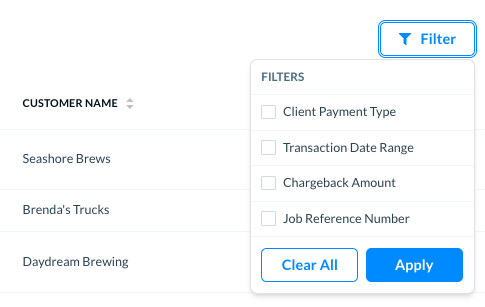
While looking at the list, you can filter it to see specific filters such as payment type, a range of dates for the transaction dates, the chargeback amount, or job reference number.
Click on Filter to see different filter options.
_____________
Apply Filters
Select a filter, and you can see options to set the filter values. For example if you select Client Payment Type, two options appear and you can select a payment type. If you select Chargeback Amount, you can set a minimum or maximum amount as the filter for the list.
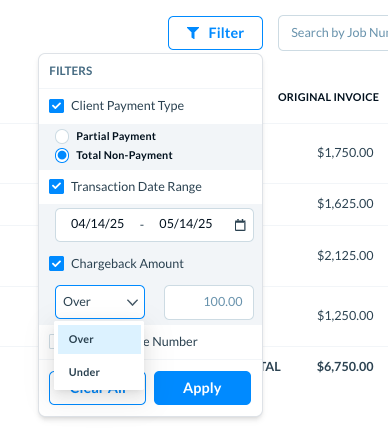
Click on Apply, and the list will show only invoices that meet the selected filter criteria.
_____________
Clear Filters
To clear the filters, click on the Filters button.
Clear the box for specific selected filter to clear it.
Click on the Clear All button to clear all the filters.
_____________________________________________________________________________
Using Search
Search the invoices using customer name or job number. As you start typing the search criteria in the Search field, the list updates automatically to show you the matching invoices.
For example, if you type the company name, only invoices associated with this company name will show, as seen below.

Click on the Reset icon to see the complete list of all records.
_____________________________________________________________________________
Options to hide a chargeback
You can hide a charged back invoice from the list, for example if you don't wish to pursue collections from a customer. This may be useful if the amount is very small or if you know that you cannot collect payment on this invoice for any reason.
Locate the target invoice in the list. You can use filters or the search option to find it, as explained earlier in this article.
There are two ways to hide an invoice:
__________
In the list
As you hover your mouse over the row, a context menu appears at the end showing three dots. Click on the three dots, as seen below.
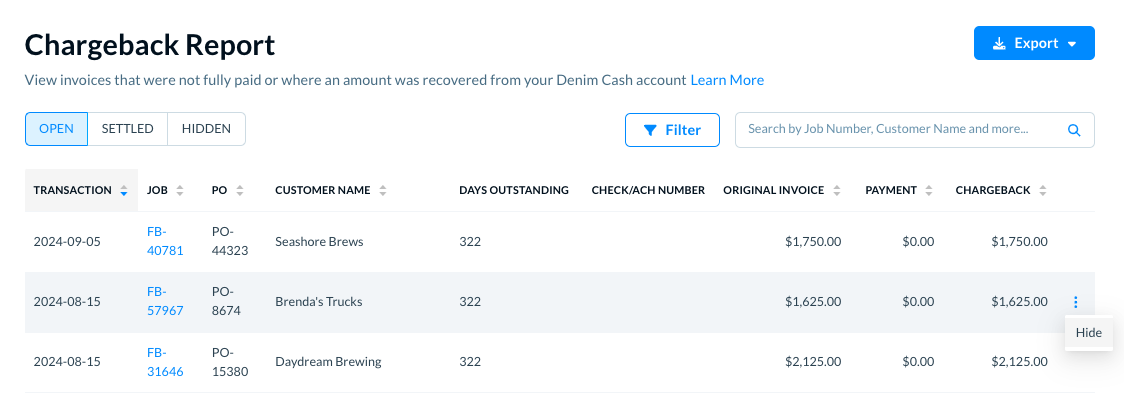
Click on Hide.
The invoice moves from the Open tab to the Hidden tab.
________________________________
In the chargeback details view
Click anywhere in the row to open the chargeback details, as seen below.
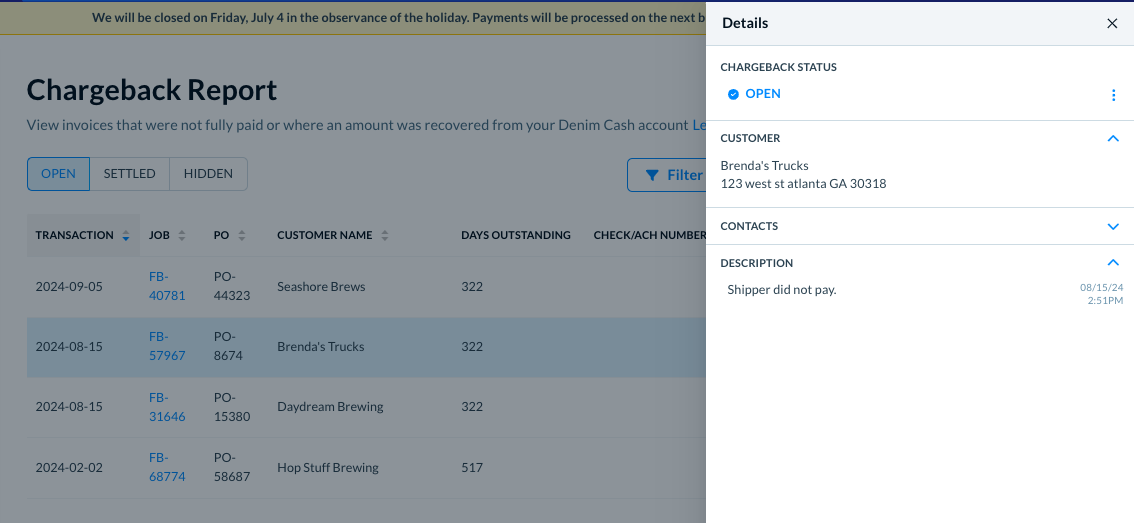
Next to the Open status, there are three dots which means that some actions or options are available there.
Click on the three dots.
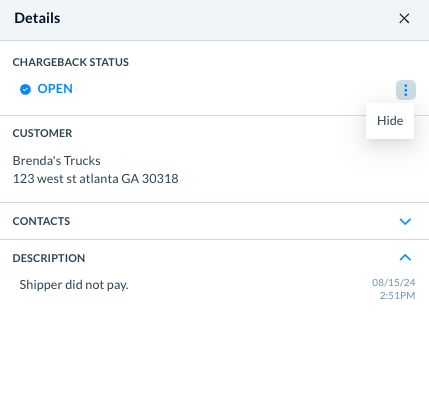
Click on Hide.
The invoice moves from the Open tab to the Hidden tab.
💡 Note: Once a chargeback is Hidden, it remains in that status even if a second chargeback occurs. This scenario could come into play if you issue a deduction for a customer's invoice, then they short pay the remaining amount due.
_____________________________________________________________________________
Export chargeback report to PDF of CSV
Click on the Export button. There are two options to export the chargeback report.
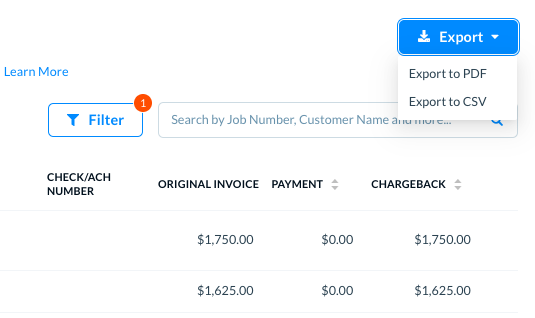
Export to PDF: Select this option to export the chargeback report to a PDF document.
Export to CSV: Select this option to export the chargeback report to a CSV file.