Denim Cash Report
Last updated: July 1, 2026
In this article, you will learn about
____________________________________________________________________________
Using the Denim Cash report
The Denim Cash report shows you the list of credits and debits, and your current Denim cash balance. For each transaction, you can see the transaction type, the source, and the date and time.
Click on Reports in the navigation. In the expanded view, click on Denim Cash Report.
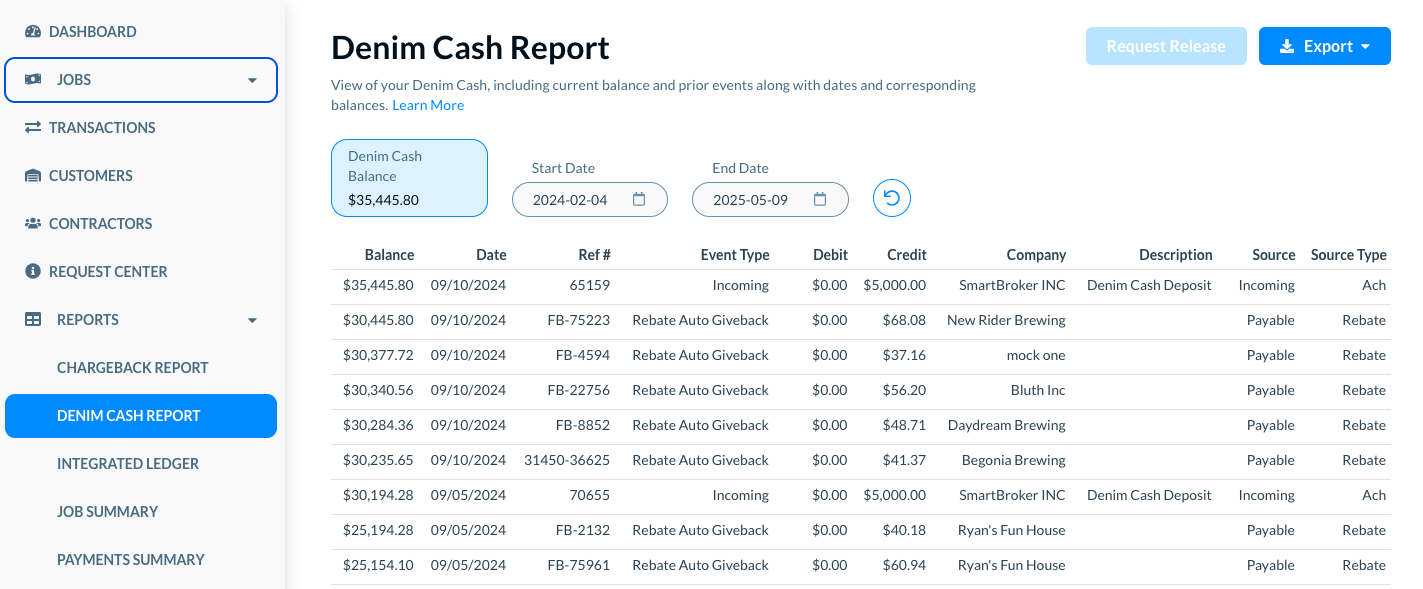
The Denim Cash Report page opens.
______________________
Denim Cash Balance
At the top in the list, the Denim Cash Balance shows your current Denim cash account balance.
____________________________________
Filter the report for a specific time period
For the list of items in the cash report, you can select the range of dates for which you want to see the report. For example, see the Start Date below.
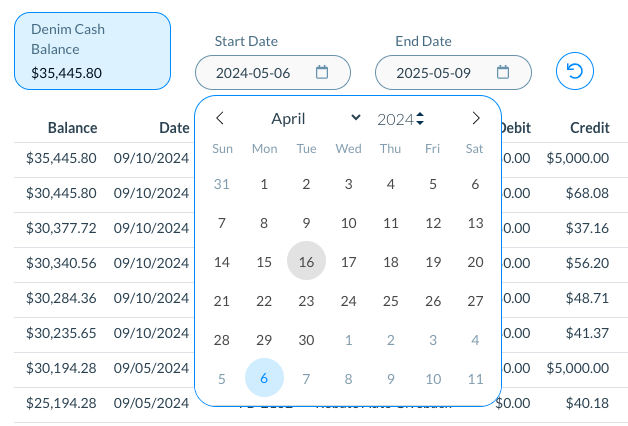
Click on the Reset icon to reset the dates to the default view.
___________________
The report details
The report shows the following details in the list.
- Balance: The account balance after the listed transaction.
- Date: The date of the transaction.
- Ref #: The reference ID for the transaction. This is normally a Denim job number.
- Event Type: The type of event for this transaction. See more details on event types later in this help article.
- Debit: The amount deducted from your balance by the listed transaction.
- Credit: The amount credited to your balance by the listed transaction.
- Company: The company associated with that transaction.
- Description: The description of the transaction.
- Source: The source of funds for the transaction—whether it is a payable, receivable, or an incoming payment transaction.
- Source Type: The source category of funds for the transacton. See more details on source types later in this help article.
_____________
Event Types
Giveback
This event occurs when Denim credits funds to your Denim Cash. The most common reason for this event is to offset a previous chargeback where your customer later pays, or when a customer overpays an invoice.
Rebate Auto Giveback
This event occurs when an invoice is closed out, and Denim sends your rebate.
Chargeback
This occurs when a debtor does not fully pay an invoice. Denim charges back the open balance to your account, debiting funds from your Denim Cash balance.
Rebate Auto Chargeback
Your rebate/reserve is charged back when there is a chargeback on the invoice greater than the rebate/reserve amount, or an over-advanced invoice where the carrier payable is larger than the customer receivable.
Outgoing
A transfer of funds from your Denim Cash balance to your bank account.
_____________
Sources of Funds
Incoming
The transaction is pulling from an incoming ACH, check, or wire payment. This is normally from a customer payment, but could be funds you forwarded to Denim to credit to your Denim Cash balance.
Outgoing
The entry is related to an outgoing transaction. Normally, this is a Denim Cash payout to your bank.
Payable
The entry is related to a payable obligation, which could be an advance or rebate.
Receivable
The entry is funded by a customer receivable
_____________
Source Types
Primary
The source of funds is the primary receivable from a job.
Advance
The funds come from an advance obligation, meaning the client's advance or contractor's advance obligation on a job.
Rebate
The funds come from the rebate obligation on a job, meaning the amount held in reserve until your customer pays.
ACH
The funds were transferred via ACH, incoming or outgoing.
Other_Expense
This type is used for miscellaneous credits or debits.
____________________________________________________________________________
Export Denim Cash report to PDF of CSV
Exporting your Denim Cash report is the best way to analyze it, or search for a specific entry. Click on the Export button. There are two options to export the Denim cash report.
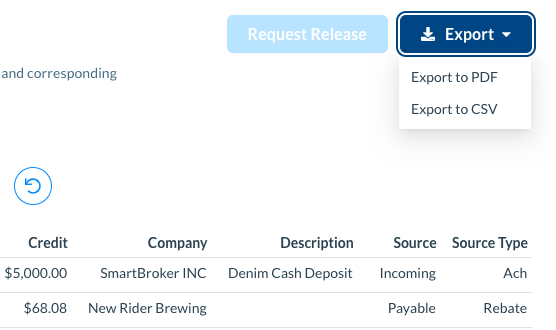
- Export to PDF: Select this option to export the Denim cash report to a PDF document.
- Export to CSV: Select this option to export the Denim cash report to a CSV file.