See how my contractor is set up for payments
Last updated: July 1, 2026
Your contractors might have different payment settings and in some cases, the payment setting might be missing.
Click on Contractors in the navigation. The list of all the contractors opens.
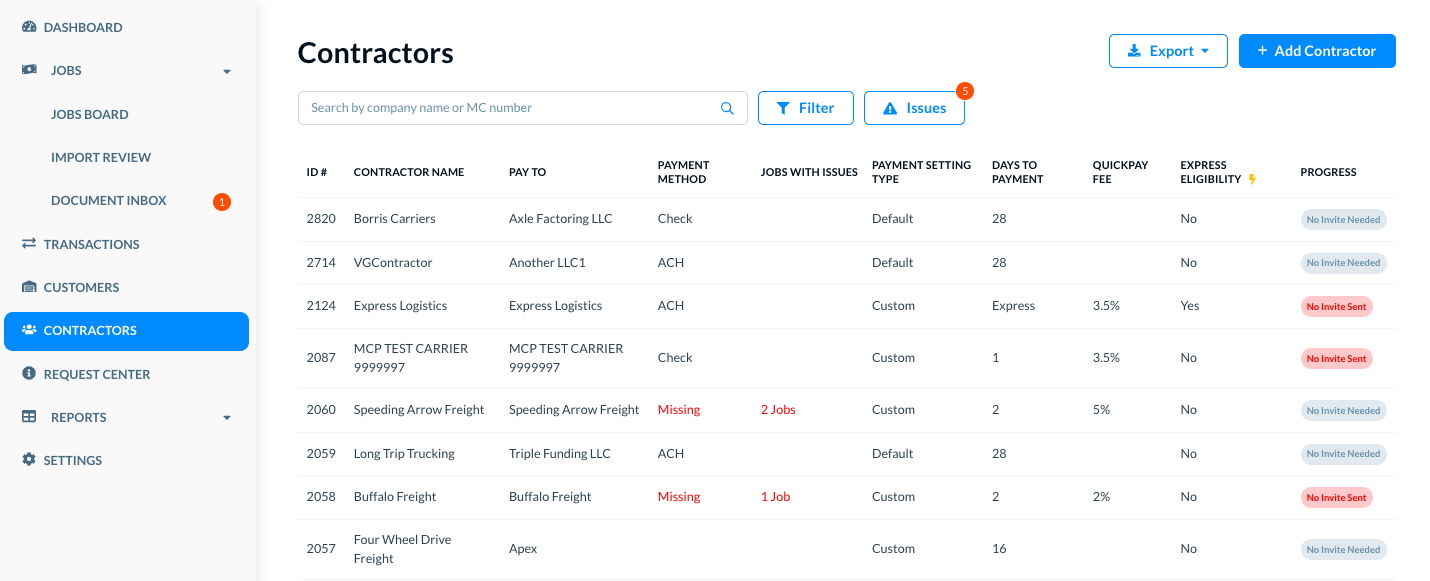
In the list of contractors, you can use the Filters or Search options to find specific contractors for certain conditions or criteria. (Please see See and use the list of contractors for more details.)
In the Pay To column, see the payment settings for each contractor. The possible options are described below.
_________________________________________
Option 1: Factor company is mentioned
In the Pay To column shows a factor company name, it means that the payments are sent to that factor. We provide the payment method as well as the address for checks or the account number for ACHs. (Please see Express Factoring for more details.)
______________________________________________
Option 2: Contractor company is mentioned
If the Pay To column shows a contractor company, the payments are sent directly to the contractor using the payment method and account number that are part of the contractor's information.
_________________________________________
Option 3: Payment method is missing
If the Payment Method column shows Missing, it means that Denim needs your contractor's payment method before we can process a payment to them. (Please see Contractor: Setup Payment Methods for the detailed instructions.)
_________________________
Setup Payment Settings
You can add or change the payment settings for any contractor, any time. See Contractor: Setup Payment Settings for detailed instructions.